

Table of Contents
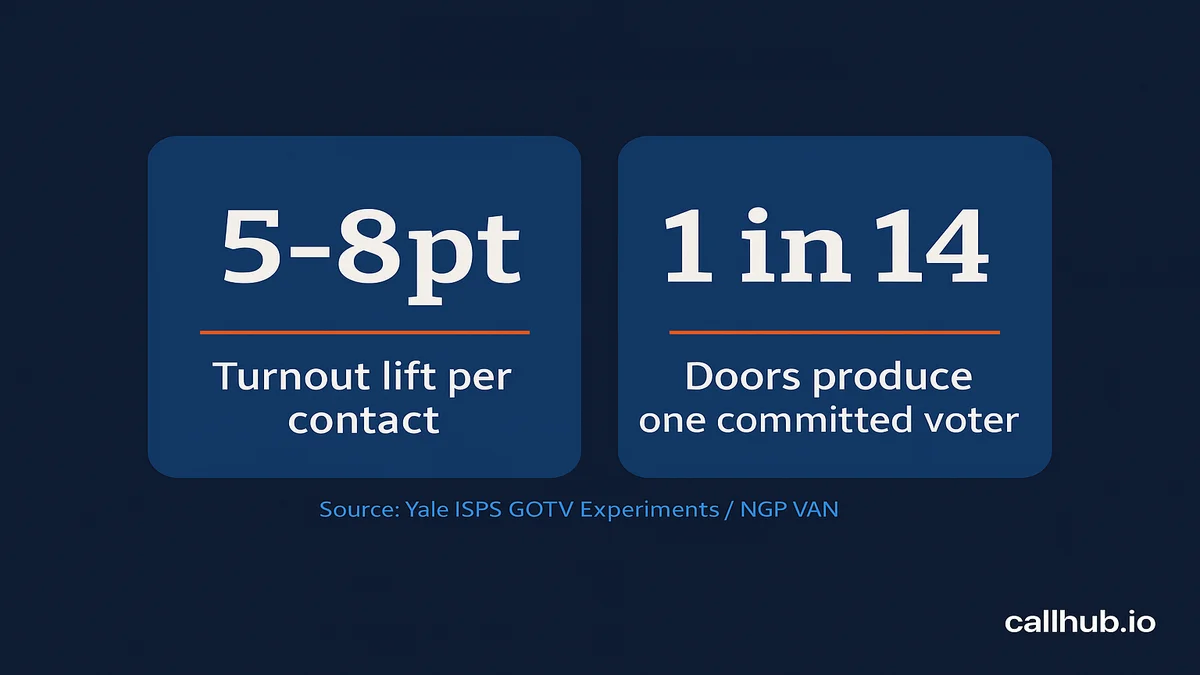
GOTV canvassing is the door-to-door phase of voter mobilization, typically run in the 72 hours before polls close, with the goal of confirming a voting plan with already-identified supporters. Of all the ways to contact a voter during get-out-the-vote, knocking on their door produces the largest turnout lift: 5–8 percentage points per contact, based on decades of field experiments catalogued in the Yale ISPS GOTV research database.
No phone call, no text, no mailer gets close at that rate.
The problem most campaigns hit is treating GOTV canvassing like an extension of voter ID canvassing. Same walk lists. Same app settings. Same script. That approach works for finding supporters, but it leaves turnout on the table once the goal shifts to mobilizing them. GOTV canvassing targets a different universe, requires a different conversation at the door, and demands a tighter data loop after each shift. This guide covers all three.
Key Takeaways
GOTV canvassing is the final-72-hour, door-to-door phase of voter mobilization aimed at confirming voting plans with already-identified supporters, and it requires a different target list, script, and data loop than earlier voter ID canvassing.
Why door knocking outperforms other channels
- Door knocking produces a 5-8 percentage point turnout lift per contact, according to decades of field experiments in the Yale ISPS GOTV research database, outpacing calls, texts, and mailers.
- A synchronous, problem-solving conversation at the door lets a canvasser learn on the spot whether a voter has a plan, what obstacle stands in the way, and what would remove it, something no text or call can replicate.
- NGP VAN’s GOTV field benchmarks put volunteer pace at roughly 20 doors per hour, generating about 1 committed voter per 14 doors knocked.
- A standard 3-hour shift yields about 60 contacts per volunteer, so 10 volunteers over a weekend produce 600 doors and roughly 43 voters moved before any text follow-up goes out.
How GOTV canvassing differs from voter ID canvassing
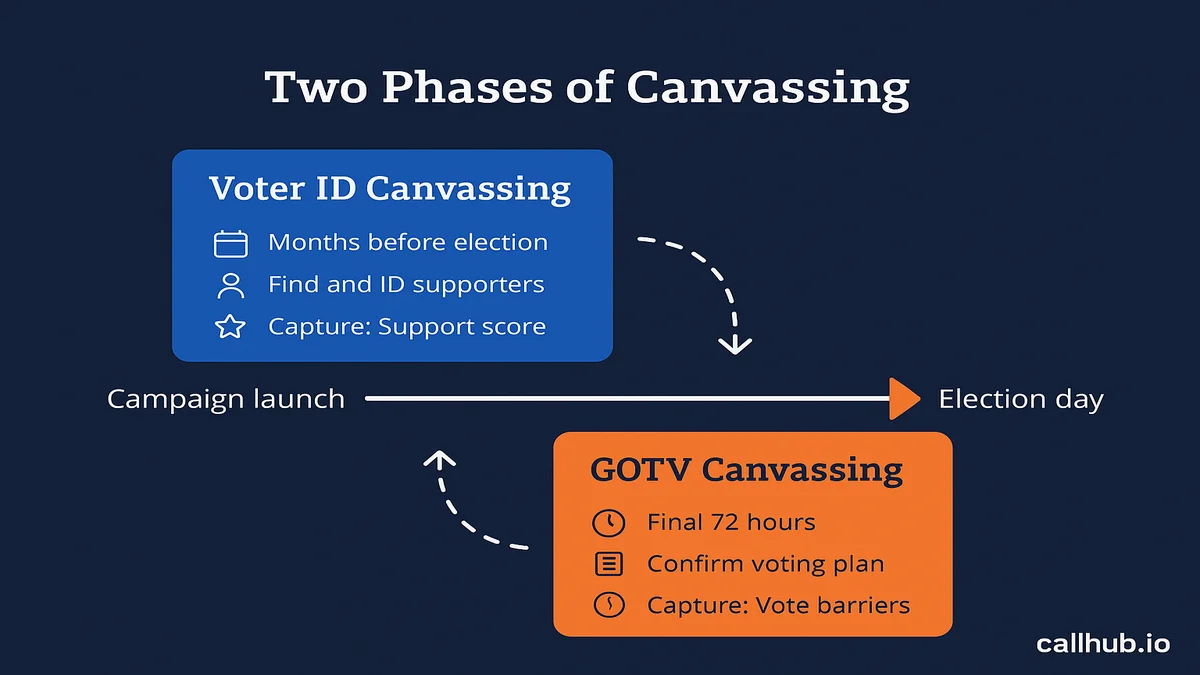
- Voter ID canvassing runs weeks or months out and targets a broad, mixed-support universe to identify where people stand and capture support scores and issue priorities.
- GOTV canvassing runs in the final 72 hours and targets known supporters with low or sporadic vote history, aiming to lock down the when, where, and how of their vote.
- The script shifts from exploratory discovery to logistics, confirming a concrete plan and clearing last-minute barriers like a moved polling place or need for a ride.
- Running a voter ID script during a GOTV walk wastes about 40% of every conversation re-covering discovery the campaign already has.
Building the GOTV target universe
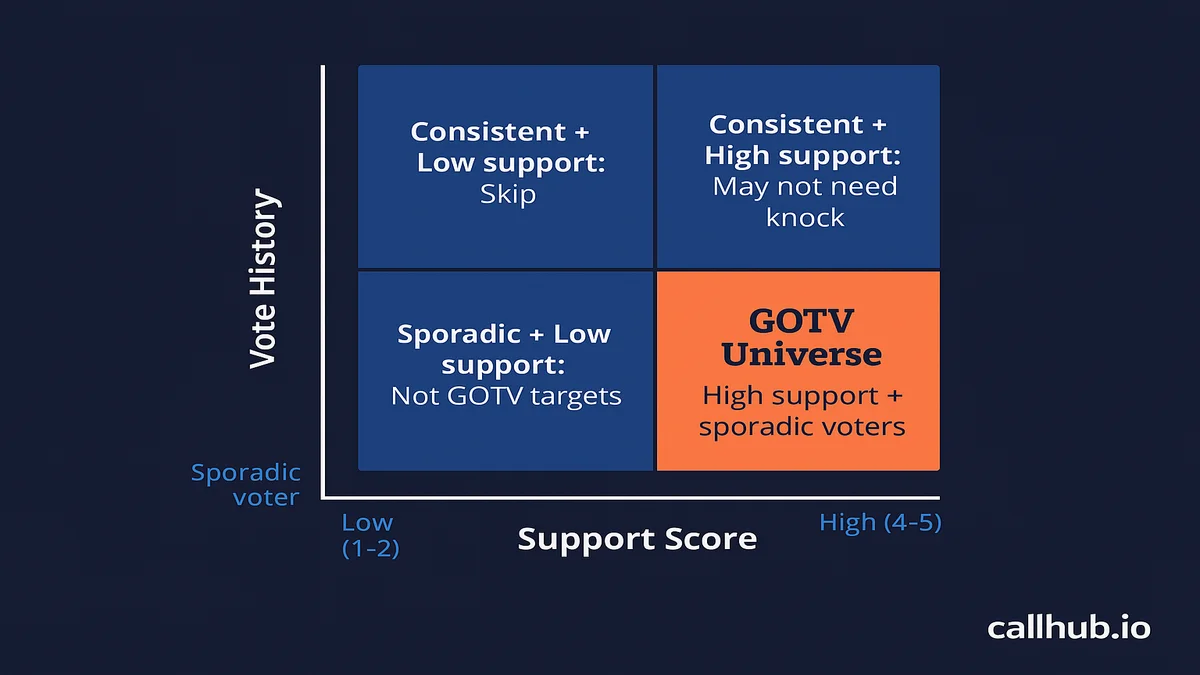
- The GOTV universe is filtered to supporters with a support score of 4 or 5 on a 1-5 scale who also show low or sporadic vote history, meaning they voted in only 1 of the last 4 elections or are first-time voters.
- Persuasion targets and strong supporters who always vote should be excluded, since mixing them dilutes volunteer effort and muddies the data.
- Universe sizing math multiplies volunteers by 60 doors per 3-hour shift to get total doors, then divides the target number of committed voters by the 1-per-14-doors benchmark to set the door goal.
- An example goal of 200 incremental voters requires 2,800 doors, achievable with 10 volunteers over roughly 5 deployment days or 20 volunteers over 3 days.
Why door knocking is GOTV’s highest-impact tactic
The 5–8 percentage point lift figure holds up across controlled field experiments because door knocking creates something no other channel can: a synchronous, problem-solving conversation. When a canvasser knocks on a door, they find out on the spot whether the voter has a plan to vote, what’s standing in the way, and what it would take to remove that obstacle.
Compare that with a text or a call. Both can remind. Neither can adapt in real time to a voter who says their polling place moved, or that they need a ride.
The operational math makes the case clearly. According to NGP VAN’s GOTV field benchmarks, a volunteer knocks roughly 20 doors per hour and door knocking generates approximately 1 committed voter per 14 doors knocked. In a standard 3-hour shift, one volunteer covers about 60 contacts. Run 10 volunteers for a weekend and that’s 600 doors, roughly 43 voters moved before a single text follow-up fires.
No broadcast channel approaches that conversion rate per contact at the same cost.
This lift shows up consistently across the broader body of GOTV research — the does GOTV work breakdown compares canvassing against phone and text turnout data channel by channel.
How GOTV canvassing differs from voter ID canvassing
Most campaigns run canvasses all cycle. The mistake is treating the GOTV canvass as just another weekend walkout. The phase has a different goal, a different target list, and a different standard for success.
| Dimension | Voter ID canvassing | GOTV canvassing |
|---|---|---|
| When | Weeks or months before election | Final 72 hours before polls close |
| Goal | Identify supporter ID and persuasion targets | Confirm a voting plan with known supporters |
| Who to target | Broad universe, mixed support levels | Identified supporters with low or sporadic vote history |
| Script goal | Find out where they stand | Lock down the when, where, and how |
| Data captured | Support score, issue priorities | Vote plan details, barriers to voting |
| Success metric | Contacts made and IDs recorded | Committed voters with a concrete plan |
Voter ID canvassing: earlier in the cycle
Voter ID canvassing happens months before election day. Canvassers are trying to find out who supports the candidate, who’s persuadable, and who’s a hard no. The conversation is exploratory. The data captured goes into the voter file to sharpen later targeting.
At this stage, campaigns cast a wide net. The universe includes low-propensity voters, undecideds, and first-time registrants. The goal is information, not mobilization.
GOTV canvassing: the final push
GOTV canvassing is not exploratory. By the time it runs, you already know who your supporters are. The only question is whether they’ll show up.
The conversation at the door shifts from “where do you stand?” to “when are you voting, and do you have a ride?” You’re confirming a plan and removing last-minute barriers. The script is shorter, more specific, and built around logistics, not persuasion.
This distinction matters for how you build the target universe, load the MiniVAN script, and train your volunteers. If you use a voter ID script for a GOTV walk, you’ll waste 40% of every conversation on discovery you already have.
For a broader look at canvassing approaches across the campaign cycle, the guide to political canvassing methods and messaging covers the full spectrum from voter ID to GOTV.
Building your GOTV target universe
A GOTV universe is not your full supporter list. It’s the subset of supporters who need a push to show up. That means filtering for people who have told you they’re with you but have a pattern of not voting.
Who to target: supporters with spotty vote history
The standard GOTV targeting formula pulls from two data points in your voter file:
- Support score of 4 or 5 (on a 1–5 scale where 5 = strong supporter)
- Low or sporadic vote history (voted in 1 of the last 4 elections, or is a first-time voter)
Strong supporters who always vote don’t need a door knock. Your volunteers’ time is better spent on someone who has told your campaign they’re with you but sat out the last two cycles. That’s the contact most likely to produce an incremental vote.
Leave persuasion targets out of the GOTV universe. GOTV canvassing is not the time to win anyone over. Mixing persuasion and mobilization targets dilutes your volunteers’ effort and muddies your data.
Universe size math
Once you have the filtered list, run the universe math before finalizing your canvass plan.
Formula:
Number of volunteers × 60 doors per 3-hour shift = total doors per deployment day
To reach a target number of committed voters, divide by 14 (the 1-vote-per-14-doors benchmark). That gives you the door goal, which tells you how many volunteer-shifts you need.
Example: You want to generate 200 incremental voters from canvassing. You need 2,800 doors (200 × 14). With 10 volunteers per day at 60 doors per shift, that’s roughly 5 full deployment days, or 3 days with 20 volunteers per day.
Build that math against your universe size before you cut turf. If your filtered list is smaller than your door goal, plan to re-contact soft commits or expand the support score criteria.
Turf cutting: 40–60 doors per canvasser
Turf cutting is the process of dividing the walk list into manageable geographic routes. Each canvasser gets a route sized so they can complete it in one shift without retracing steps or driving between addresses.
The standard turf size is 40–60 doors per route. Under 40 and the canvasser finishes early with nothing left to do. Over 60 and they’ll run out of time before the list is done.
Cut turfs by geographic density. Urban neighborhoods with tight spacing support 60-door turfs. Suburban or rural areas with longer distances between stops need smaller routes. For the GOTV push, prioritize turfs around high-density supporter areas so canvassers spend more time knocking and less time walking.
Setting up MiniVAN and Sidekick for your GOTV canvass
MiniVAN is the canvassing platform built into the Voter Activation Network (VAN), used by Democratic campaigns and progressive organizations in the United States. The Sidekick app is the mobile interface volunteers use on their phones to navigate walk lists, record results, and sync data back to VAN. Both require access to your campaign’s active VAN account.
Creating the canvassing project in VAN
- Log into your state VAN account at votebuilder.com (for Democratic and progressive campaigns) or the relevant state access point.
- Go to Canvassing in the left nav, then select Manage Canvassing Projects.
- Click New Project and name it clearly: “GOTV Week 1 – Chicago – Nov 5” or whatever city and date applies to your canvass.
- Set the project type to GOTV (not Voter ID). VAN uses this setting to filter survey questions and apply the correct result codes.
- Under List Settings, apply your pre-built GOTV universe list. Confirm the universe size matches your plan before saving.
- Set the project dates to cover your deployment window only. Close the project after election day so stale turfs don’t appear in volunteers’ apps.
Assigning turfs and loading the GOTV script
- In the project, click Create Turf. VAN will prompt you to draw turfs on a map or import a pre-built turf file.
- For map-drawn turfs: draw each route as a polygon covering 40–60 addresses. Name each turf with the canvasser’s name or an assigned code you’ll use at the briefing.
- Click Edit Survey Questions and add your GOTV script questions. At minimum: “Do you plan to vote on [Election Day]?” and “Do you need any assistance getting to the polls?”
- Set result codes to match your GOTV workflow: Voted, Hard commit to vote, Soft commit, Not home, Moved, Refused.
- Confirm the script is attached to the project before publishing turfs. Volunteers cannot see the questions without this step.
Volunteer app setup: Action ID and walk list download
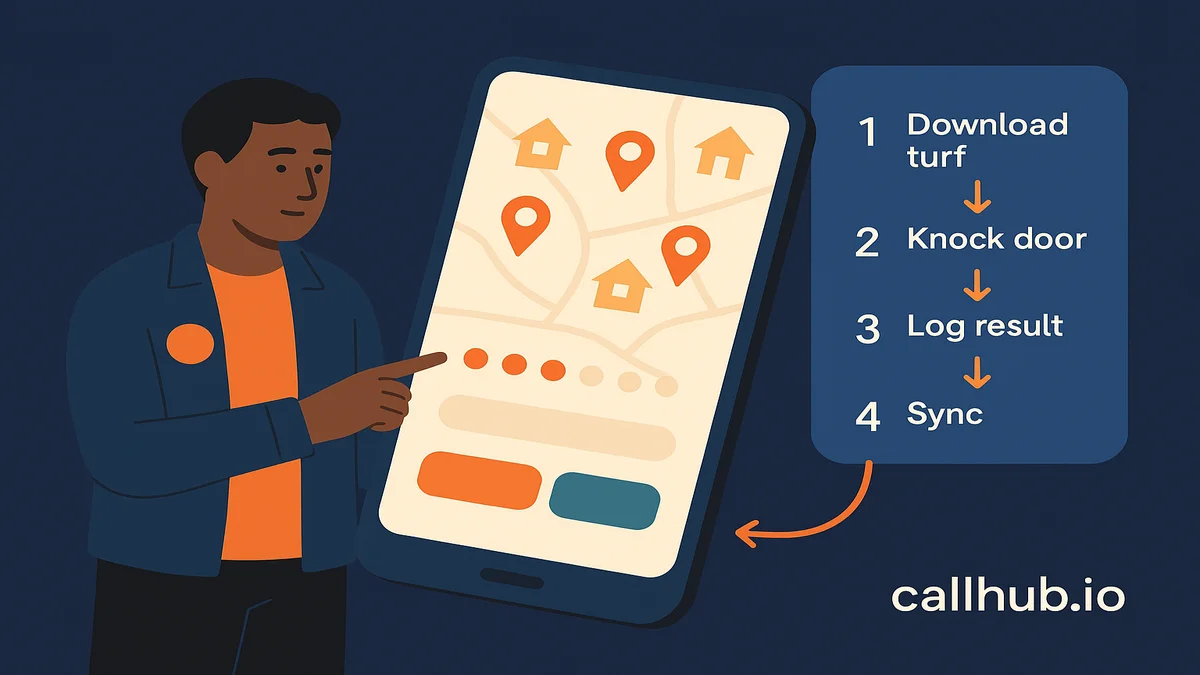
Each volunteer needs the MiniVAN Sidekick app (available on iOS and Android). Setup steps before the canvass:
- The volunteer downloads Sidekick and logs in using the Action ID your campaign admin provides. Each campaign issues its own Action ID for access control.
- In the app, the volunteer selects the correct canvassing project by name.
- The volunteer downloads their assigned turf. Sidekick downloads the walk list locally so it works without a cell signal in low-coverage areas.
- Before the volunteer leaves the staging area, confirm their turf is loaded and the survey questions display correctly on-screen.
- Walk through one practice door knock during the briefing so every volunteer knows exactly what they’re logging and how to navigate each result.
Monitoring in real time with MiniVAN Manager
While volunteers are in the field, the field director can track progress in real time through the MiniVAN Manager view in VAN. As volunteers sync their results, the map updates with completed doors, allowing you to spot turfs that are falling behind and reassign contacts if needed.
Check the sync rate at the halfway point of each shift. If a volunteer hasn’t synced in over an hour, they may have lost signal or need help.
GOTV door knock scripts: what to say at the door
A GOTV door knock is not a persuasion conversation. The volunteer already knows the person is a supporter. The script’s only job is to confirm a voting plan and identify any barriers that need solving.
Keep the opener brief. Long introductions give the voter a reason to close the door before the conversation gets to the point.
The 72-hour countdown script
Use this script for canvasses running Wednesday through Friday before a Tuesday election:
“Hi, is [voter name] home? Great. I’m a volunteer with [Campaign Name]. Election day is [Day], and I wanted to make sure you had a plan to vote. Are you planning to vote on [day]?”
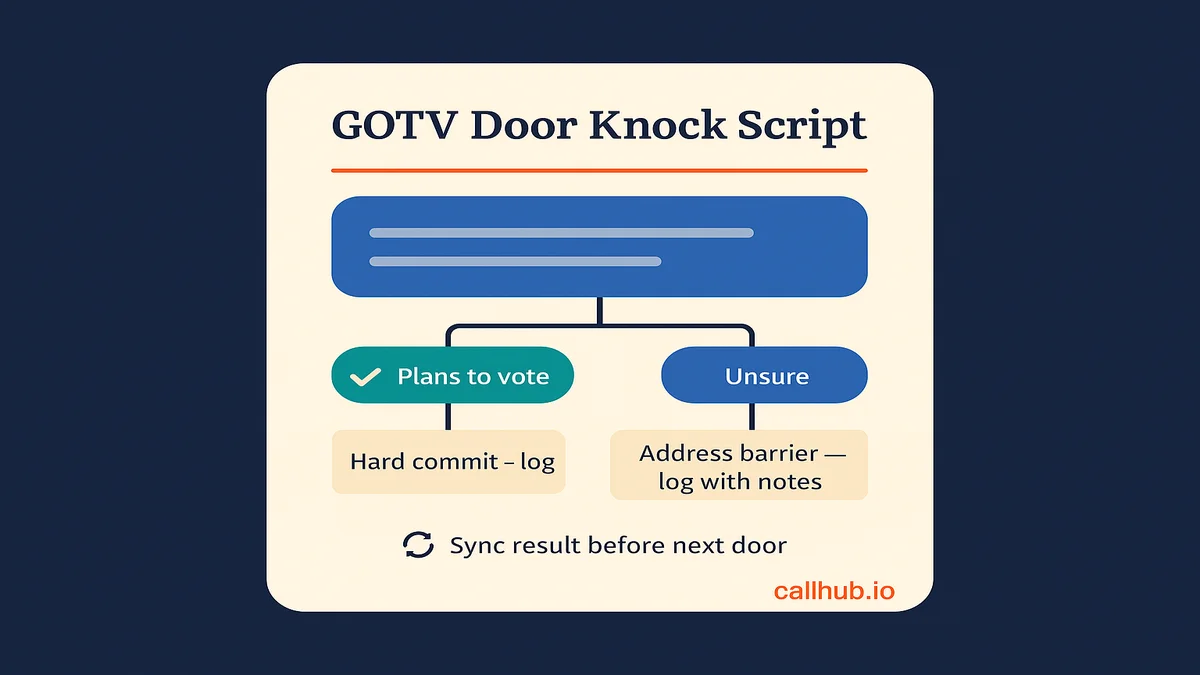
If yes: “That’s great to hear. Do you know where your polling place is? [Confirm address if needed.] And do you need a ride or any help getting there?”
If they confirm a plan: Log as Hard commit and close: “Perfect. We’re counting on you. Thanks for your time.”
If they’re unsure: “No problem. Your polling place is [polling address], and polls are open from [hours]. What would make it easier to get there?” Address the barrier if possible, then log the contact with notes.
The election day morning script
Use this script on election day, typically from 9 AM to 2 PM for morning and midday runs:
“Hi, is [voter name] home? I’m a volunteer with [Campaign Name]. Polls are open right now until [time]. Have you had a chance to vote yet?”
If no: “Your polling place is [polling address]. It’s only [X] minutes from here. Is there anything that would stop you from getting there today?”
If they need a ride: Log as Needs ride and contact field headquarters immediately for volunteer driver dispatch.
If they’ve already voted: Log as Voted and thank them. This contact is complete.
Handling common objections
Keep responses short. The goal is to remove barriers, not debate.
- “I’m planning to go later.” “Sounds good. Polls close at [time]. We just want to make sure you have everything you need.”
- “I already voted early or by mail.” “Great, thank you. You’re all set.” Log as Voted.
- “I don’t have time today.” “I understand. Is there anything that would make it easier? We have a ride program if that helps.”
- “I changed my mind.” Don’t engage. Log as Refused and move to the next door.
Coordinating volunteers on canvass day
The difference between a well-run canvass and a scrambled one usually comes down to the 30 minutes before volunteers leave the staging area.
Pre-canvass briefing checklist
Run through this at every shift:
- [ ] Every volunteer has Sidekick installed and their turf loaded
- [ ] Practice door knock completed with the GOTV script
- [ ] Every volunteer knows their turf boundaries and how to reach field headquarters if they get lost
- [ ] HQ phone number saved in every volunteer’s phone
- [ ] Result codes reviewed: Hard commit, Soft commit, Needs ride, Not home, Refused
- [ ] Sync reminder given: Tap Sync in Sidekick every 20–30 doors, not just at the end of the shift
That last point is worth reinforcing at every briefing. Volunteers who wait until the end of a 60-door shift to sync lose all data if the app crashes or the phone dies.
Shift timing and team pairing
| Day | Recommended hours | Notes |
|---|---|---|
| Weekdays (Mon–Fri) | 4 PM – 8 PM | Voters are home from work; families are in for the evening |
| Saturday | 10 AM – 4 PM | Widest availability window; avoid dinner time |
| Sunday before election | 12 PM – 5 PM | Highest completion rate of the GOTV weekend |
| Election day | 9 AM – 2 PM | Focus on soft commits; leave afternoon for phone and text follow-up |
Pair experienced canvassers with new volunteers wherever possible. New canvassers slow down in the first 20 doors as they get comfortable with the app and script. Pairing them with a veteran keeps the pace up and reduces logging errors. For the fundamentals of briefing volunteers on a GOTV-specific script and mindset before they hit the doors, see training volunteers for GOTV.
Data syncing and post-canvass debrief
The post-canvass data workflow is the step that separates campaigns that compound their canvassing gains from campaigns that reset after every shift.
After every shift, run through this sequence:
- Final sync: Every volunteer syncs their Sidekick app before leaving the staging area. The field director confirms all turfs show a sync time from the current shift.
- Result review: In VAN Manager, check the breakdown of result codes. A high “Not home” rate on a turf usually means the canvasser was working during bad hours. Shift that route to the next day’s optimal window.
- Ride program flag: Pull all contacts logged as “Needs ride” and pass them to your volunteer driver coordinator immediately. Don’t let this list sit overnight.
- Universe cleanup: Remove Voted, Moved, and Hard Refuses from tomorrow’s turf. Your volunteers should not be re-knocking voters who have already committed or declined.
- Canvasser debrief: Spend 5–10 minutes asking what objections came up, what worked in the script, and which doors were hard. Canvassers are your best source of on-the-ground intelligence about what’s worrying your voters in the final days.
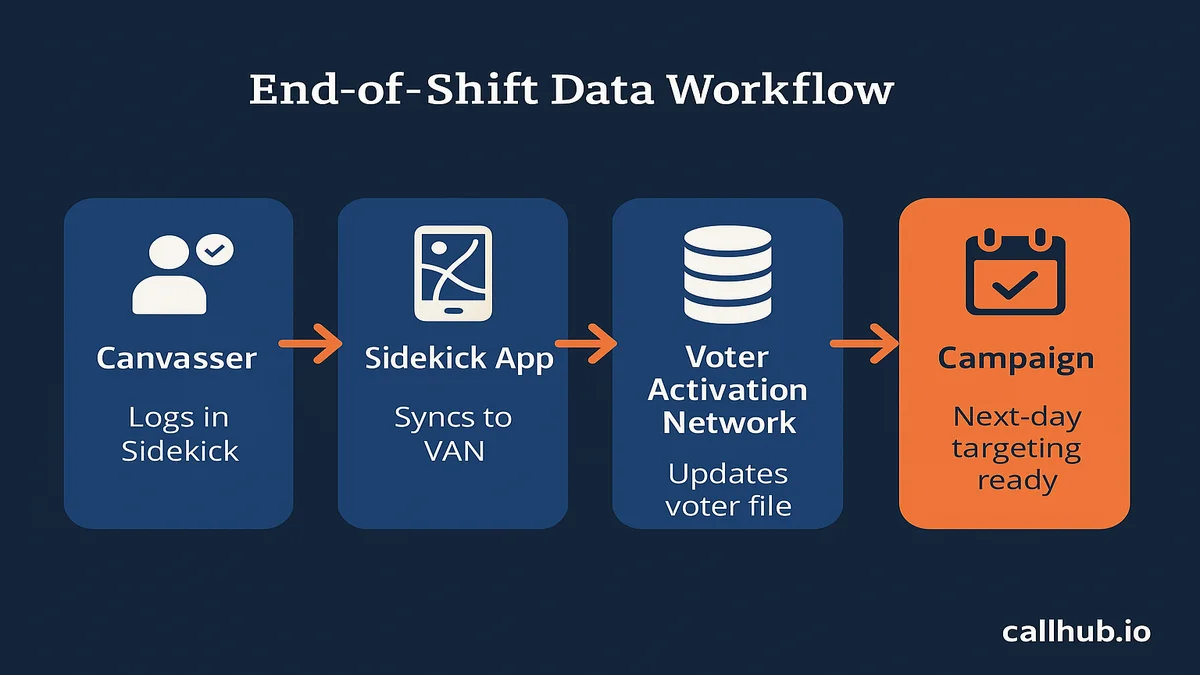
Campaigns that combine text follow-ups with door canvassing see the biggest lift when canvass data flows into the same contact queue as their digital outreach. When a canvasser logs a soft commit on Wednesday, that voter should receive a text reminder election day morning from the same campaign. That coordination requires your VAN data and your text program to share a common voter file. The complete GOTV strategy guide covers how to build the full cross-channel GOTV program around your canvass results.
Run your next GOTV canvass with CallHub
GOTV canvassing is the highest-converting voter contact method in the field organizer’s toolkit, but it doesn’t work in isolation. The campaigns that maximize their door-knocking lift are the ones pairing it with digital follow-ups that reinforce the conversation at the door.
When a canvasser logs a soft commit, that voter should receive a text reminder the morning of election day. When someone wasn’t home, a call or peer-to-peer text that evening picks up the contact before the shift closes out. That coordination, between what your canvassers log in MiniVAN and what your text and call programs send next, is where your GOTV lift compounds. For the full day-of playbook covering shift timing, precinct tracking, and the poll-closing push, see Election Day GOTV operations.
CallHub’s text banking and peer-to-peer texting tools are built for that workflow, as part of CallHub’s GOTV platform. They draw from the same voter files your canvass is working from, and campaigns using CallHub for political GOTV outreach can sequence canvassing and digital contact in one coordinated program.
For a full breakdown of the canvassing software options that handle turf cutting, mobile walk lists, and post-canvass data sync, the canvassing software guide for field campaigns covers the tools your team needs across the GOTV operation.
Frequently asked questions
What is GOTV canvassing?
GOTV canvassing is door-to-door voter mobilization run in the final 72 hours before election day. Unlike voter ID canvassing, which identifies new supporters, GOTV canvassing targets already-identified supporters who have a history of low or inconsistent voter turnout. The goal is to confirm a voting plan, not persuade.
How many doors can a volunteer knock in one shift?
A volunteer averages roughly 20 doors per hour. In a standard 3-hour shift, that’s around 60 contacts. In high-density urban areas with tightly spaced addresses, some volunteers reach 70–75 doors. In suburban or rural areas with driving time between stops, 40–50 is a more realistic target.
How effective is door knocking for voter turnout?
Door knocking produces a 5–8 percentage point increase in voter turnout per contact, according to field experiments documented in the Yale ISPS GOTV research database. That’s the highest per-contact lift of any GOTV outreach channel. NGP VAN benchmarks the conversion at approximately 1 committed voter per 14 doors knocked.
When should GOTV canvassing start?
Most campaigns begin GOTV canvassing three to five days before election day. Larger campaigns may start as early as the week before in high-priority precincts. The final 72 hours, from Saturday evening through Monday, are the highest-impact window because the proximity to election day makes the voting plan conversation most concrete. For how this fits into the full run-up to election day, see the GOTV timeline.
What is the Sidekick app?
Sidekick is the mobile canvassing app from NGP VAN that volunteers use to navigate walk lists, record door-knock results, and sync data back to the Voter Activation Network (VAN). It works offline, which is essential in areas with limited cell coverage, and automatically uploads results when the device reconnects.
How many volunteers do I need for a GOTV canvass?
Divide your door goal by 60 (the average doors per 3-hour shift) to get the required volunteer-shift count, then plan the number of volunteers and days from there. If you need to knock 3,000 doors and have 5 days available, that’s 10 volunteers per day. Adjust the math based on your available universe size and the canvassing window before election day.
What is a canvassing turf?
A canvassing turf is a geographically bounded walk list assigned to one canvasser for one shift. Turfs are typically sized at 40–60 doors for a 3-hour shift. In VAN, turfs are drawn as map polygons and downloaded directly to the volunteer’s Sidekick app. The turf boundaries keep canvassers from overlapping with each other and ensure every address in the universe gets covered.